
What Is a Fair Value Gap (FVG)?
How to Mark It and Find Entries
A fair value gap (FVG) is an imbalanced price gap between the wicks of candle 1 and candle 3, where unfilled buying or selling is still left over. Learn to mark bullish FVGs and bearish FVGs, find BUY/SELL entries and set your SL, with real gold chart examples.
Quick summary before you read
- A fair value gap (FVG) is the gap between the wicks of candle 1 and candle 3 that forms when candle 2 moves strongly · it is an imbalanced price area where buying or selling is still left over
- Long green candle = bullish FVG (support) · long red candle = bearish FVG (resistance)
- In an uptrend, BUY when price comes down to test a bullish FVG with the SL below the zone · in a downtrend, SELL when price rises to test a bearish FVG with the SL above the zone
- If price closes below the bottom of a bullish FVG or breaks below it, delete the zone straight away
- Mark zones automatically for free with the FVG (Nephew_Sam_) indicator on TradingView, see section 05
Previous lessons: EP1 Trends and trendlines · EP2 Trading sideways markets · EP3 Trend reversals · EP4 Trendline + speed line · EP5 Demand & supply zones
What is a fair value gap (FVG)?
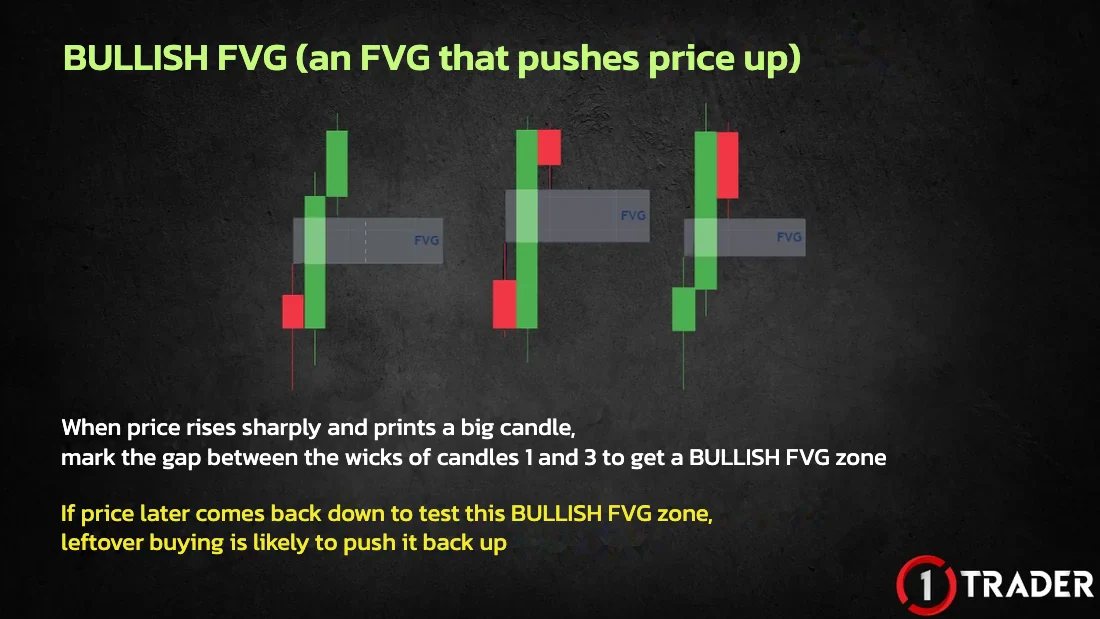
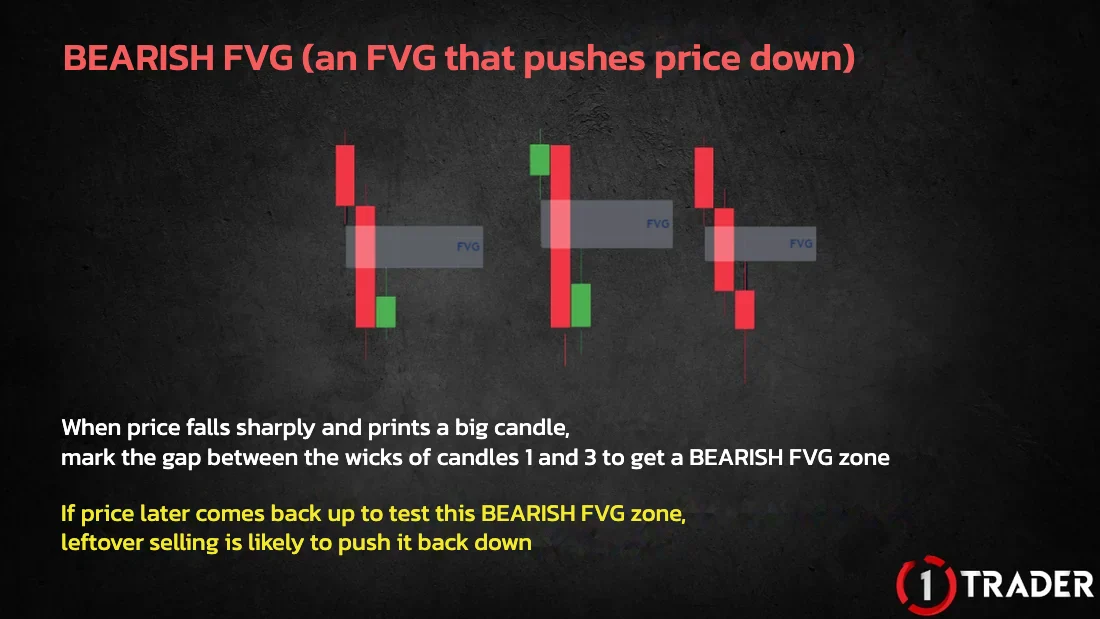
A fair value gap (FVG) is support or resistance that comes from a price gap between candle 1 and candle 3. The gap is seen as an “imbalanced” price area where buying or selling is still left over, so price is likely to come back and “fill” the gap later.
We take advantage of price coming back to fill that imbalanced gap by looking for entries and setting the SL, just as with demand / supply zones and order blocks. They all act as support and resistance, they just look different.
There are 2 types of FVG: the bullish FVG (which pushes price up) and the bearish FVG (which pushes price down) · review order blocks in the EP5 order block section
Types of FVG: bullish FVG and bearish FVG
Bullish FVG = support
Bearish FVG = resistance
Finding entries with a bullish FVG on a gold chart
1) Mark the bullish FVG and BUY with the trend
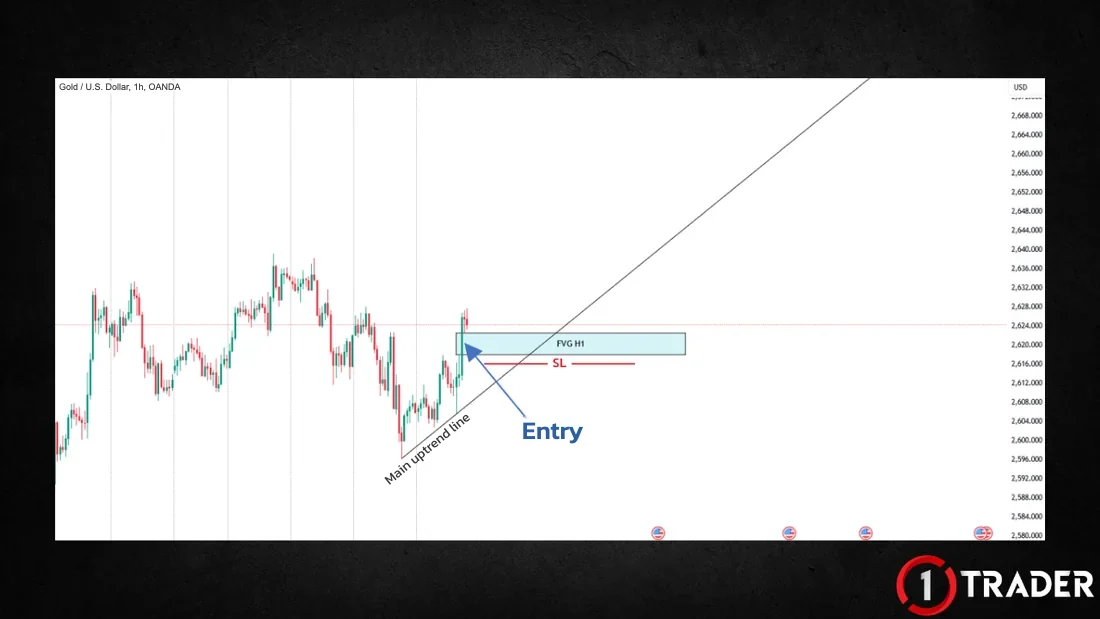
On this H1 gold (XAUUSD) chart the current trend is up, and price rises sharply to print a big green candle. When you see a long green candle like this, mark the gap between the wicks of candles 1 and 3 to get a bullish FVG zone (the blue box in the image).
If price later comes down to test the FVG zone, whether at the top edge, the middle or the bottom edge of the zone, leftover buying is likely to push it up, so you can BUY with the trend straight away and set your SL below that FVG zone (always place the SL below whichever FVG zone you entered from).
2) A new FVG zone forms → add a BUY
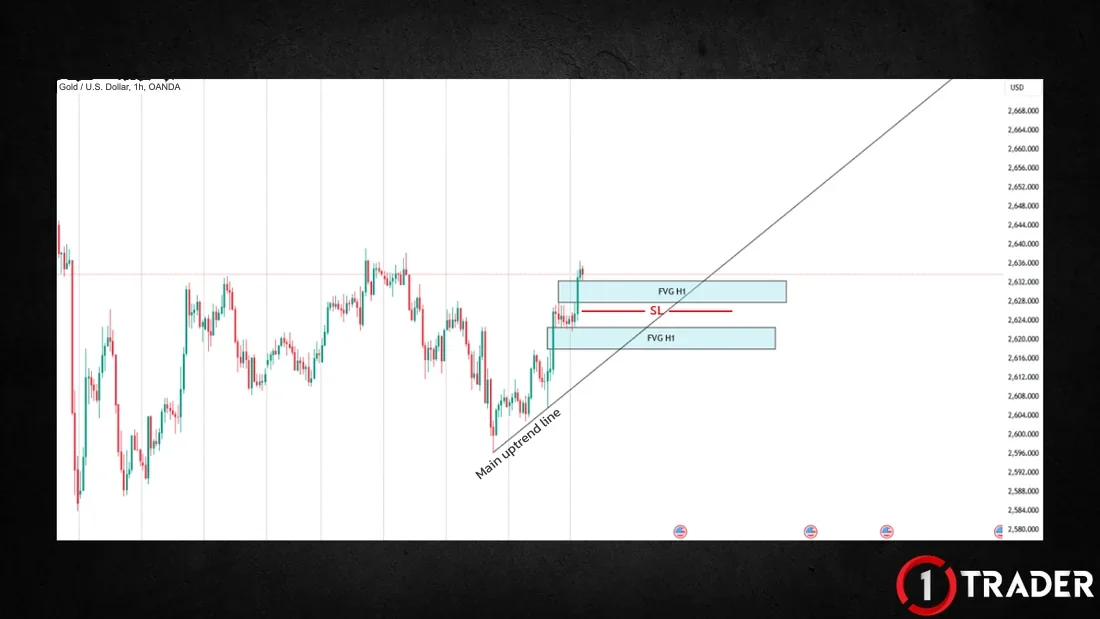
Leftover buying in the first FVG zone pushes price up, and it also creates a new FVG zone because it prints another long green candle you can mark. In this case, if price comes back down to the new FVG zone, you can add another BUY with the trend, but you must set the SL below the new zone.
3) It stays support until price closes below the bottom
In the end price rises with the trend, and as long as price has not closed below the bottom of the FVG or broken below it, this FVG zone can keep acting as support.
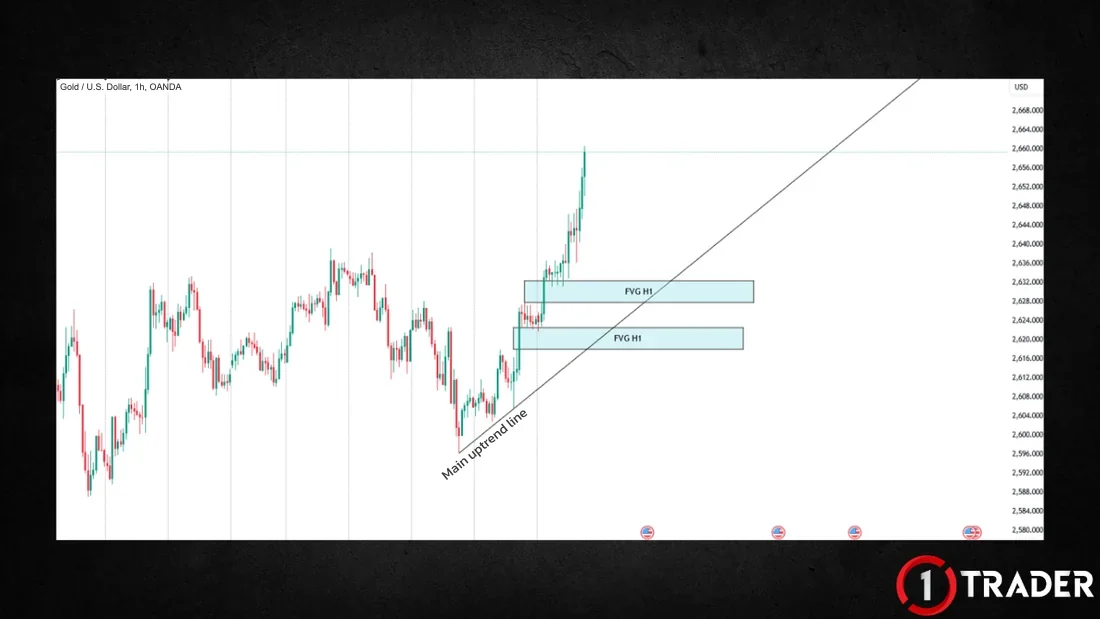
If price closes below the bottom of the FVG or breaks below it, delete that FVG zone straight away, because it means there is no leftover buying left to act as support.
Finding entries with a bearish FVG on a gold chart
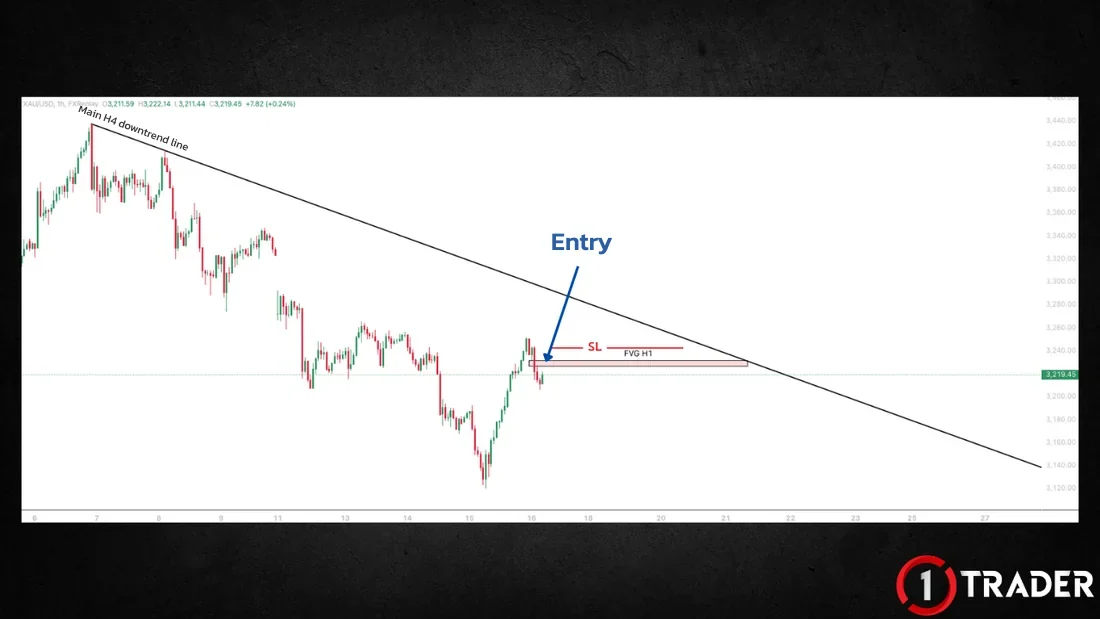
The current H1 trend is sideways, but it sits inside an H4 downtrend, and you can draw a main trendline along that downtrend (the black line at the top). So you can look for SELL setups with the H4 trend. Price then prints a big red candle, which gives a bearish FVG zone (the red box in the image).
If price later rises to test this FVG zone, leftover selling is likely to push it down, so you can SELL straight away and set your SL above that FVG zone.
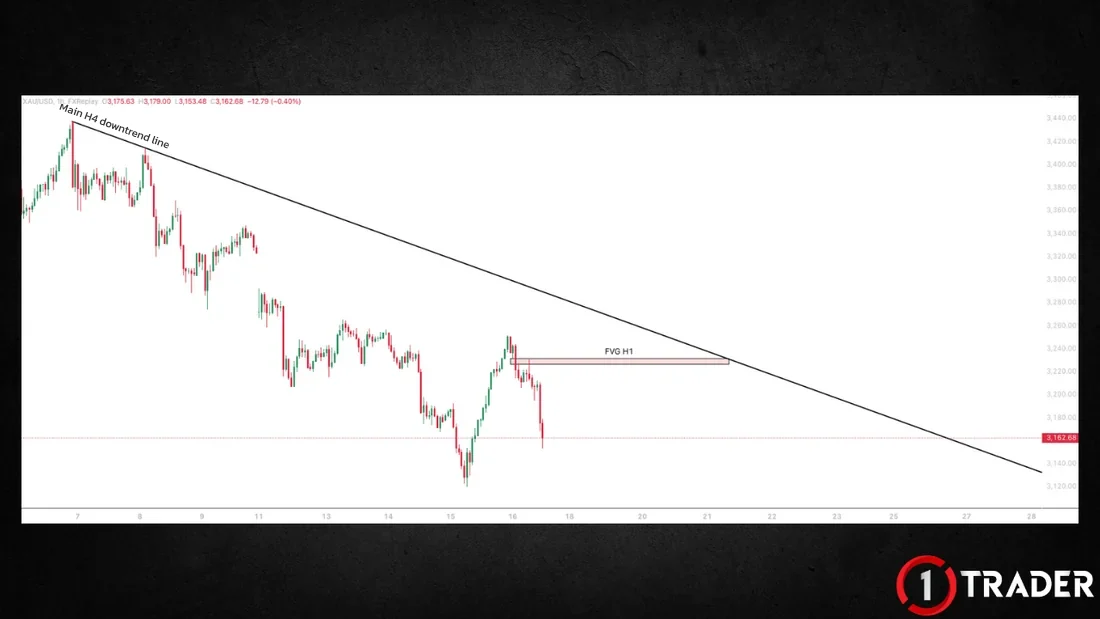
FVGs work best with the trend · in an uptrend, focus on BUY at bullish FVGs · in a downtrend, focus on SELL at bearish FVGs · review how to read the trend in EP1 What is a trend
An indicator that marks FVGs automatically on TradingView
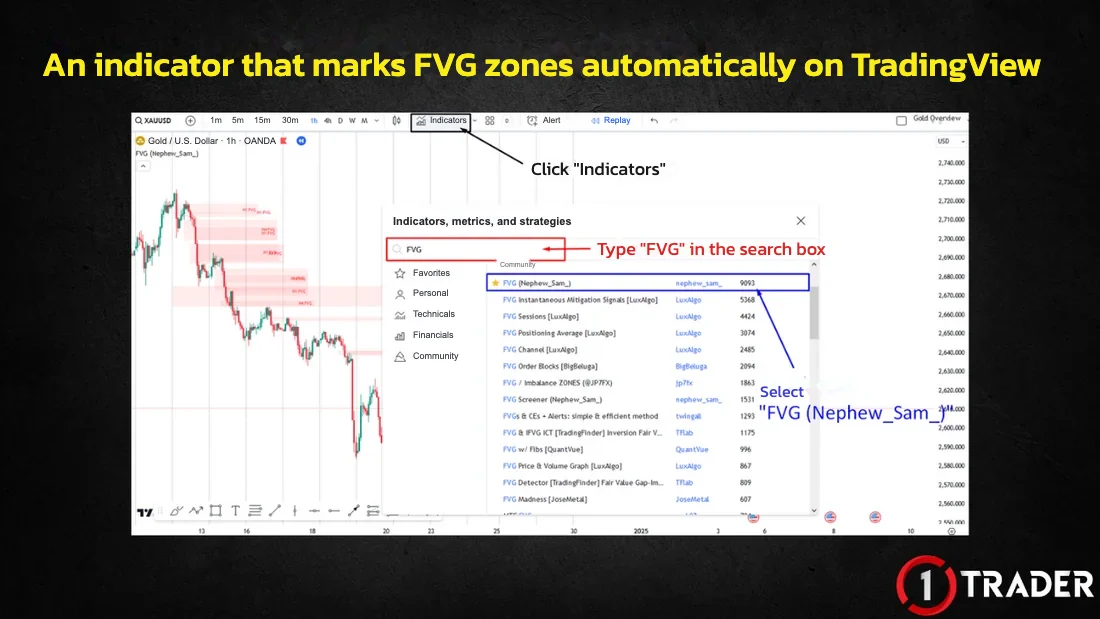
You can mark FVGs by hand because the idea is simple, but scanning the chart takes time and strains your eyes. That is why we use an indicator that marks FVG zones automatically. It is free, with no cost at all.
Search for FVG (Nephew_Sam_)
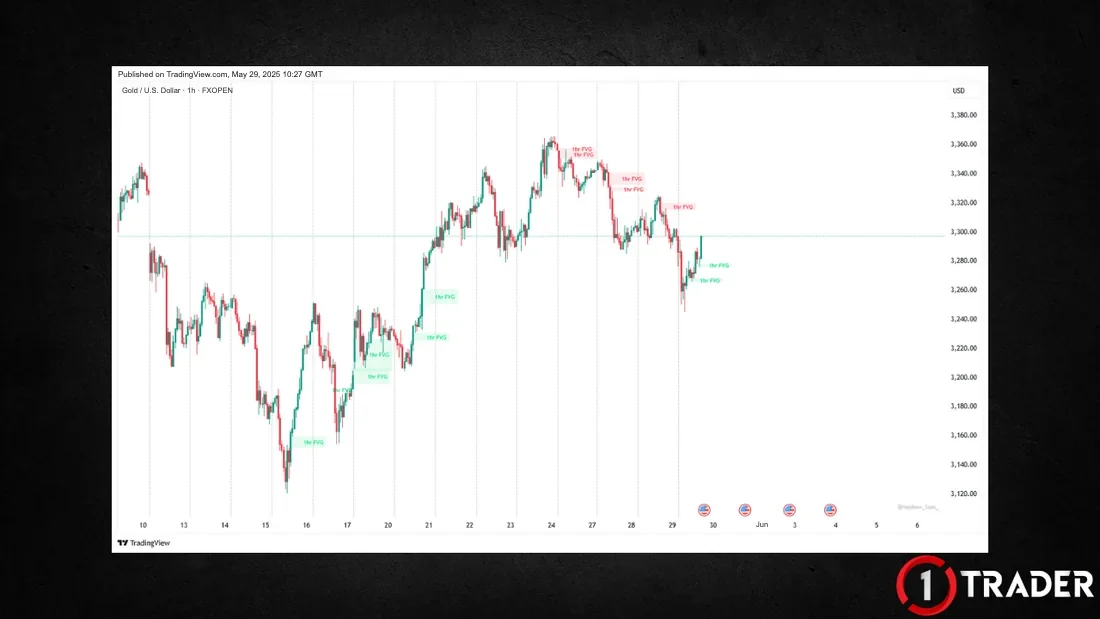
Summary: trading the fair value gap (FVG)
| Zone | How to mark | Entry | Trade | Stop Loss |
|---|---|---|---|---|
| Bullish FVG | Long green candle · wick gap between candles 1–3 | Price comes down to test the zone (top/middle/bottom) | BUY | Below the FVG zone |
| New bullish FVG zone | A new long green candle during the trend | Price comes back down to the new zone | Add a BUY | Below the new zone |
| Bearish FVG | Long red candle · wick gap between candles 1–3 | Price rises to test the zone | SELL | Above the FVG zone |
| Delete the zone | — | A close below the bottom of a bullish FVG, or a break below it | Stop using that zone | No leftover buying |
| Indicator | FVG (Nephew_Sam_) on TradingView | Marks zones automatically · free | With the trend | Based on the zone you enter from |
The key to trading the fair value gap: read the trend first, then use FVGs on the same side as the trend (bullish FVGs in an uptrend · bearish FVGs in a downtrend). Enter when price comes back to test the zone, always place your SL outside the zone you entered from, and delete the zone once price closes through its edge.
FAQ about the fair value gap (FVG)
What is a fair value gap (FVG)?
A fair value gap (FVG) is support or resistance that comes from a price gap between candle 1 and candle 3. The gap is seen as an imbalanced price area where buying or selling is still left over, so price is likely to come back and fill the gap later.
How do you mark an FVG zone?
When price moves so strongly that it prints a big candle (candle 2), mark the gap between the wicks of candle 1 and candle 3. A long green candle gives a bullish FVG, and a long red candle gives a bearish FVG.
What is the difference between a bullish FVG and a bearish FVG?
A bullish FVG forms when price rises sharply and acts as support: when price comes back down to test it, leftover buying is likely to push it up. A bearish FVG forms when price falls sharply and acts as resistance: when price comes back up to test it, leftover selling is likely to push it down.
Where should you place your stop loss when trading FVGs?
For a BUY at a bullish FVG, place your SL below the FVG zone you entered from. For a SELL at a bearish FVG, place your SL above the FVG zone you entered from. If you add a trade at a new FVG zone, set the SL based on that new zone.
When should you delete an FVG zone?
As long as price has not closed below the bottom of a bullish FVG or broken below it, the zone can still act as support. If price closes below the bottom or breaks below it, delete the zone straight away, because there is no leftover buying left to act as support.
How is an FVG different from an order block or a demand and supply zone?
They all act as support and resistance, and you find entries and set your SL the same way. The difference is the shape: an FVG uses the gap between the wicks of candles 1 and 3, an order block uses the single candle before a strong break, and a demand or supply zone uses the whole sideways range.
Which TradingView indicator marks FVG zones automatically?
Search for FVG in the TradingView indicators menu and choose FVG (Nephew_Sam_). It is free to use, and it marks FVG zones on the chart automatically.
Read EP5 again Next lesson · EP7 What Is Divergence? Reading RSI Signals for a Pause or Reversal Classic & hidden divergence · real gold chart examples · free indicator
Read EP7 →
See all lessons in the free Forex and gold trading course
Risk warning: Trading Forex, gold and CFDs carries a high level of risk and you may lose money. 1TRADER provides information and education to support your own decisions only. The real chart examples use historical data and do not guarantee future results. Read the full risk disclosure.