
Free Divergence Indicators for TradingView and MT4
Indicators that draw divergence lines between price and RSI automatically, both classic and hidden, with step-by-step setup on MT4 and TradingView and how to read the signals for trade entries.
Quick summary before you read
- 2 free divergence indicators: RSI Divergence Indicator on MT4 and Divergence for Many Indicators v4 on TradingView
- They draw classic and hidden divergence between price and RSI automatically, so you no longer miss signals
- MT4 installs through Market (MQL5 login needed); on TradingView, search in the indicators menu and set it up as shown
- Divergence signals are not trade orders; always check the trend, support and resistance, and set a stop loss
Previous lessons: EP1 Trends · EP2 Sideways markets · EP3 Trend reversals · EP4 Speed line · EP5 Demand & supply zones · EP6 FVG · EP7 Divergence · EP8 FIBO · EP9 Money management · EP10 Free backtesting · EP11 Stochastic · EP12 Bollinger Bands · EP13 Starting capital · EP14 Sniper (All-in) · EP15 Free TradingView · EP16 Zone indicator · EP17 RSI
How does a divergence indicator help?
After learning RSI divergence (EP7) and finding entries with RSI (EP17), the most common beginner problem is not spotting the signal, or not telling classic from hidden. So this lesson introduces free indicators that draw divergence lines for you automatically.
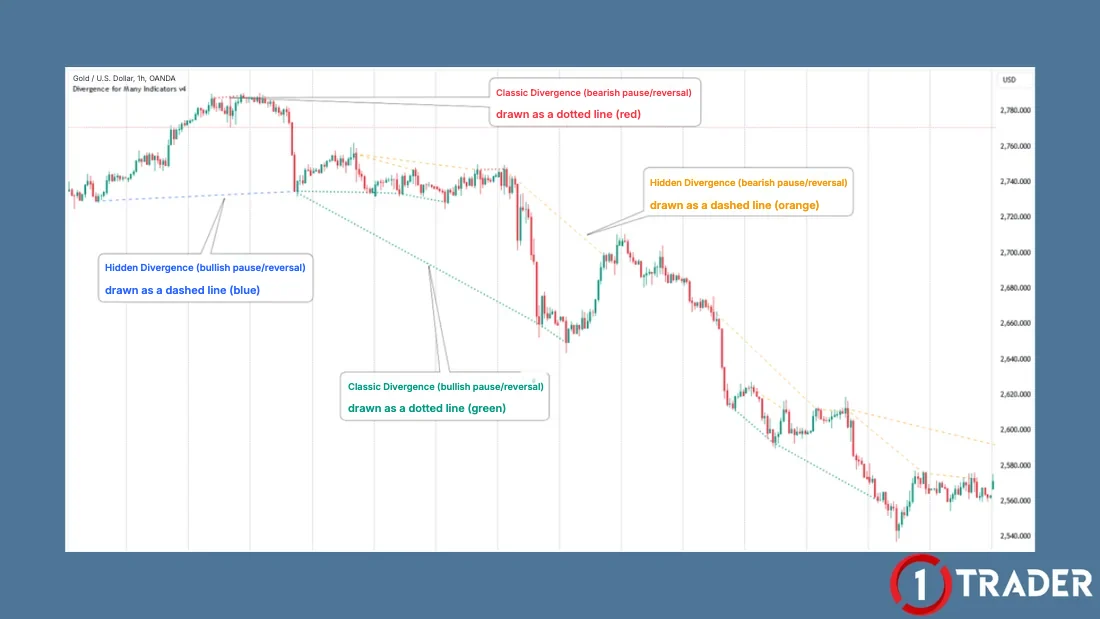
Recap the 4 types of divergence before you start
The indicator draws the lines, but you still need to know what they mean. If you haven’t studied it yet, read EP7 What is divergence first, then come back to install.
- 1 Classic bullish divergence
- Price makes a lower low but RSI makes a higher low; selling pressure is fading and price may pause or turn up
- 2 Classic bearish divergence
- Price makes a higher high but RSI makes a lower high; buying pressure is fading and price may pause or turn down
- 3 Hidden bullish divergence
- Price makes a higher low but RSI makes a lower low; often seen on pullbacks in an uptrend, used to time trend continuation
- 4 Hidden bearish divergence
- Price makes a lower high but RSI makes a higher high; often seen on bounces in a downtrend, used to time trend continuation
Every type of divergence says price is no longer in step with momentum: price may ‘pause or reverse’, which doesn’t mean it must reverse right away.
How to install the divergence indicator in MT4 (6 steps)
This indicator is a free download from Market inside MT4, with no files from outside websites, but you need an MQL5 Community account first.
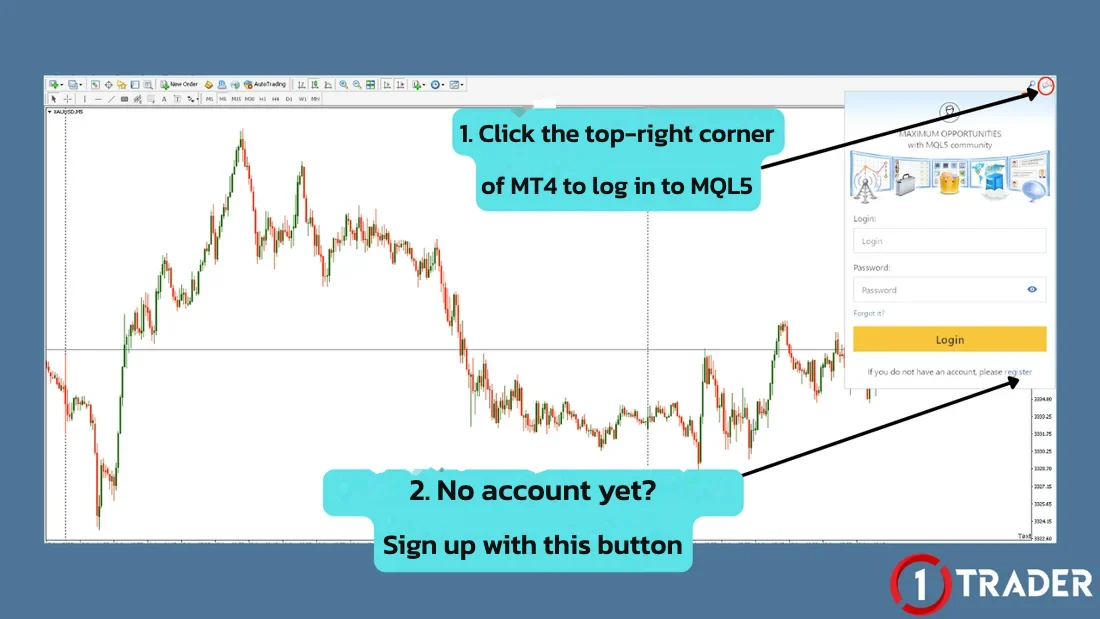
Step 1: Log in to MQL5 Community
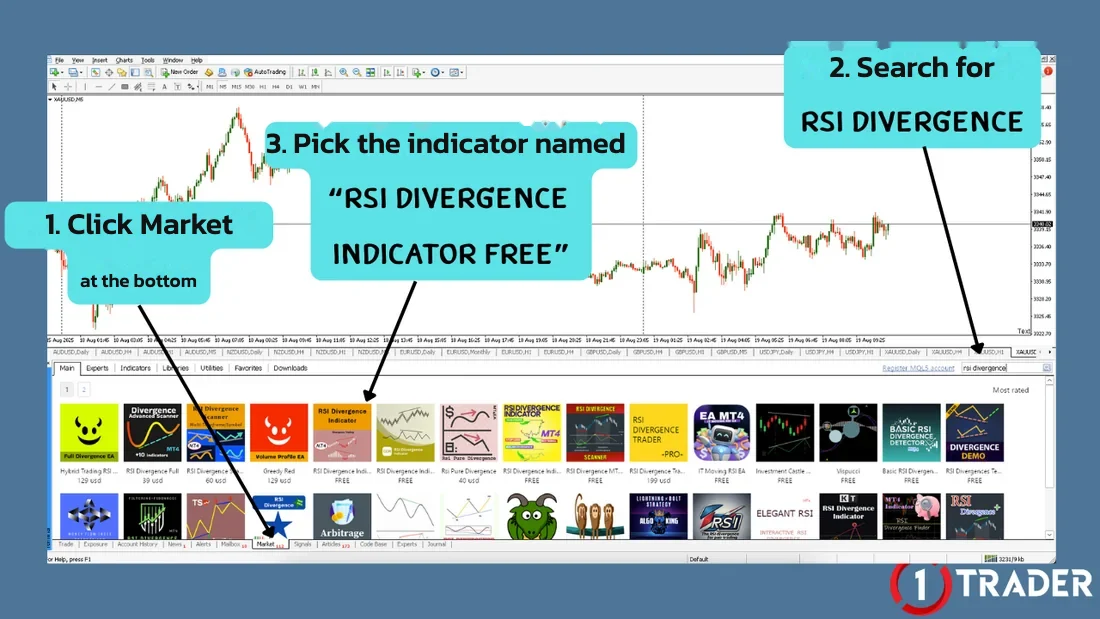
Step 2: Search in Market
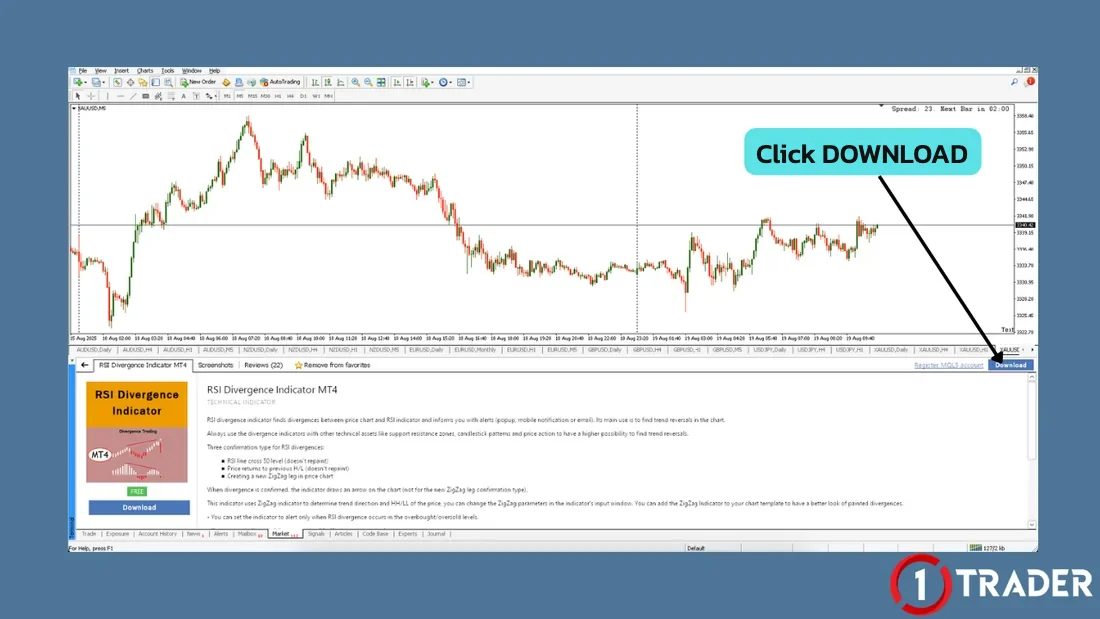
Step 3: Click Download
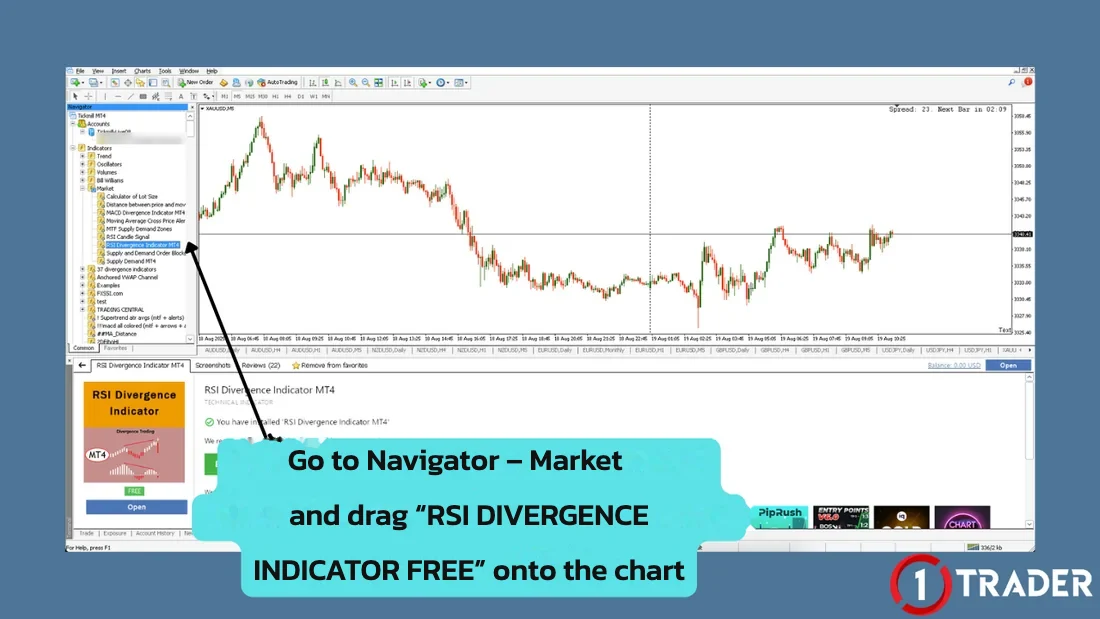
Step 4: Drag the indicator onto the chart
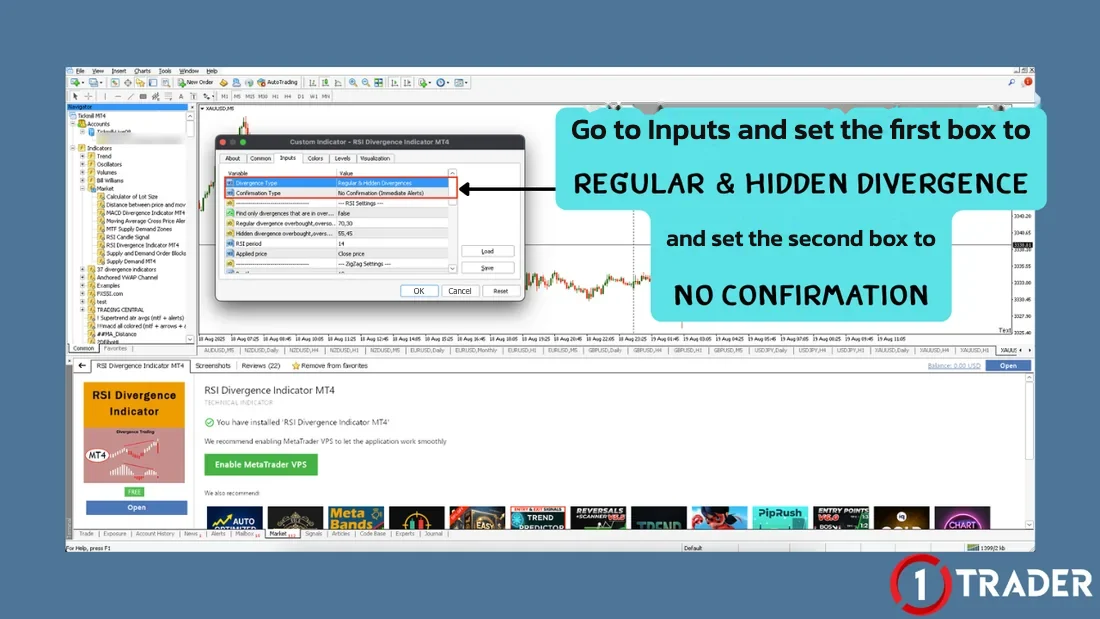
Step 5: Set the Inputs tab
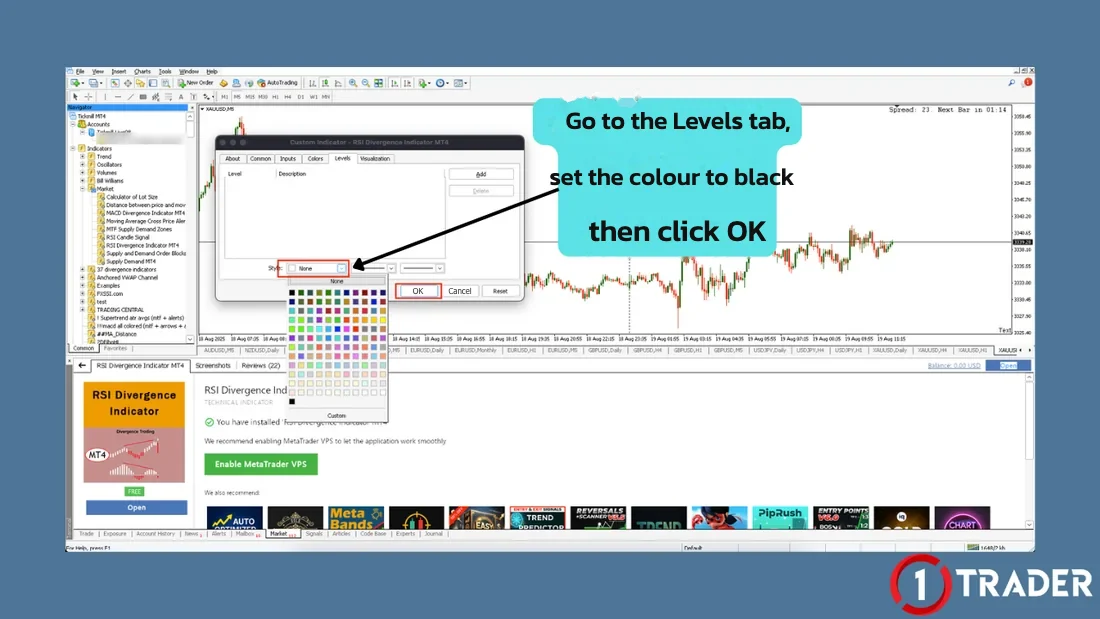
Step 6: Set the Levels colour
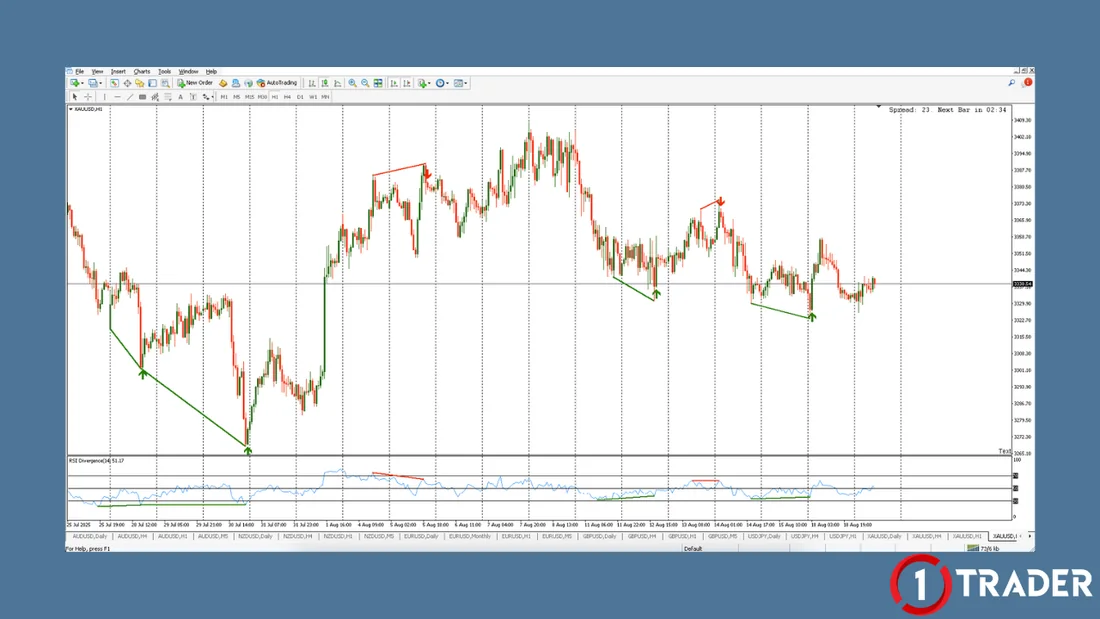
The result on the MT4 chart
To avoid dragging the indicator in every time, right-click the chart, choose Template > Save Template, then load that template on other charts.
No Confirmation makes signals appear sooner but unconfirmed, so lines or arrows may change or disappear before the reversal actually happens. Treat them as a warning and wait for a confirmation candle before entering. Indicators from the MT4 Market work with MT4 only, not MT5.
How to use the divergence indicator in TradingView
It works with a free TradingView account. If you’re new to TradingView, see how to sign up and open a chart in EP15 How to use TradingView for free (the free plan limits indicators per chart; this one counts as 1).
Step 1: Find the indicator
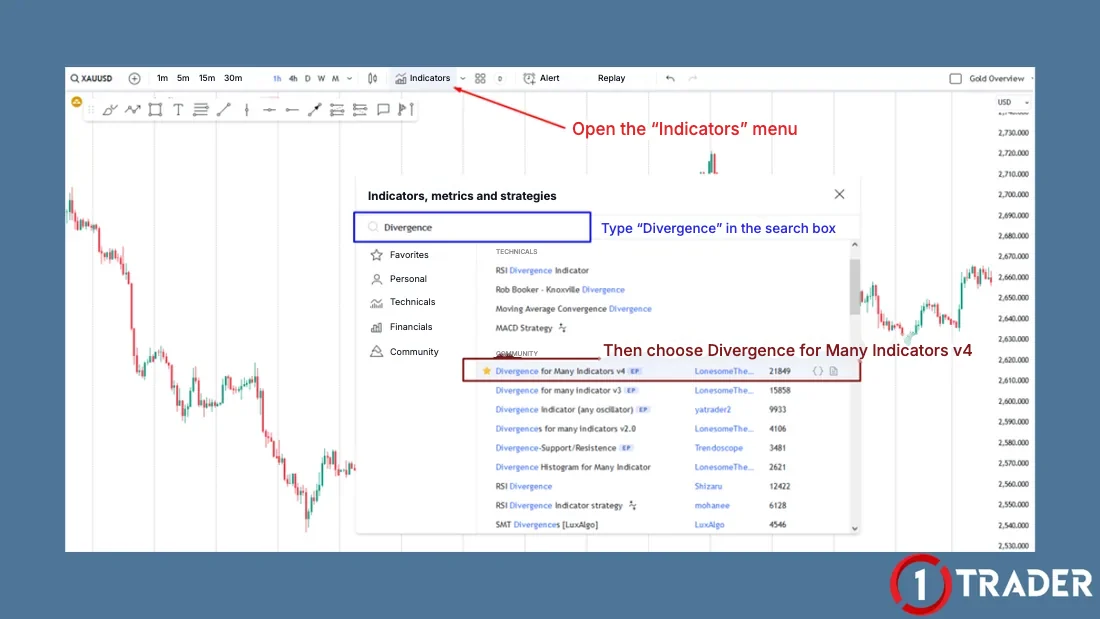
Step 2: Set the Inputs tab
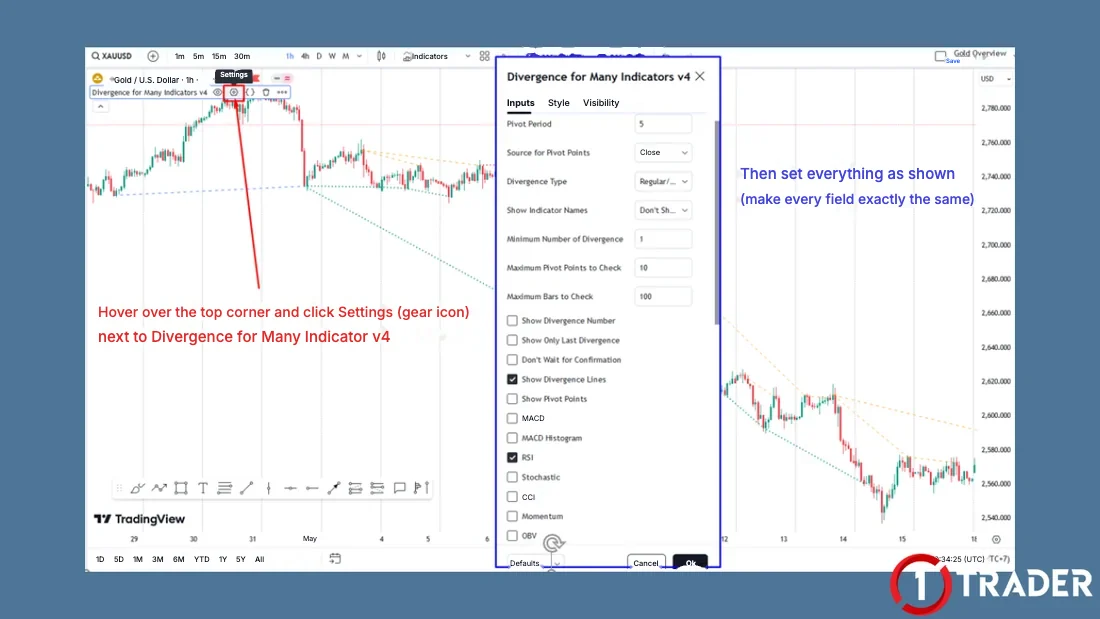
- Pivot Period
- 5 (pivots confirmed by 5 candles on each side)
- Source for Pivot Points
- Close
- Divergence Type
- Regular/Hidden to show both classic and hidden
- Show Indicator Names
- Don’t Show
- Minimum Number of Divergence
- 1
- Maximum Pivot Points to Check
- 10
- Maximum Bars to Check
- 100
- Ticked boxes
- Only Show Divergence Lines and RSI; untick the others (MACD, Stochastic, CCI, OBV, MFI and so on)
Step 3: Set colours and line styles
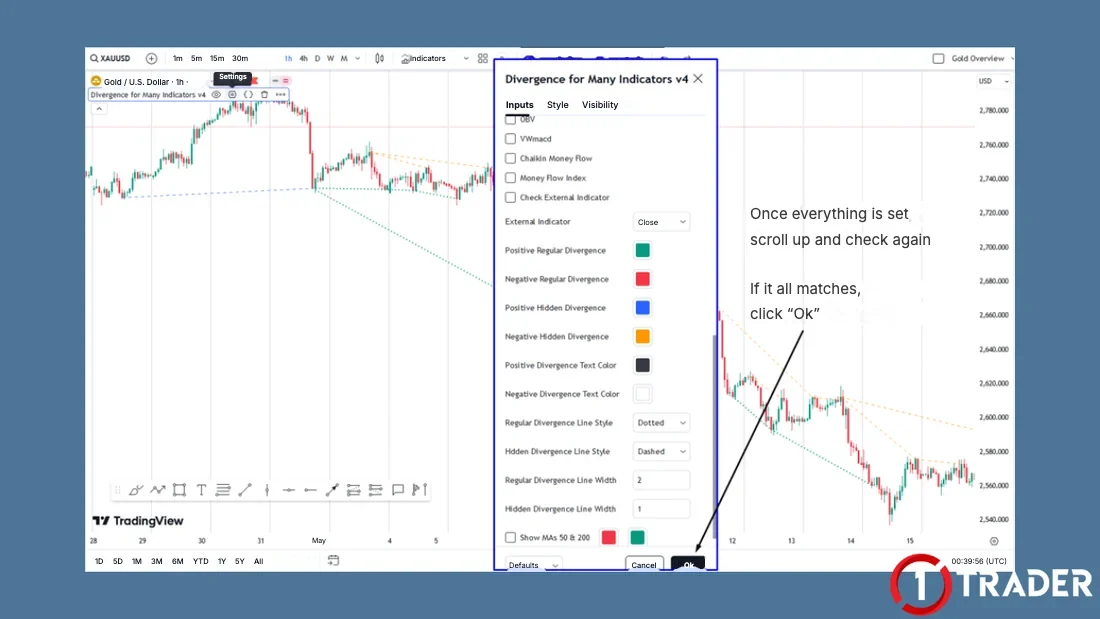
- Positive Regular Divergence
- Green · classic bullish
- Negative Regular Divergence
- Red · classic bearish
- Positive Hidden Divergence
- Blue · hidden bullish
- Negative Hidden Divergence
- Orange · hidden bearish
- Regular Divergence Line
- Style Dotted · Width 2
- Hidden Divergence Line
- Style Dashed · Width 1
Reading the lines on the TradingView chart
A pivot period of 5 means the indicator waits for 5 more candles after a high or low to confirm the pivot, so lines appear slightly after the actual point but don’t disappear later. Ticking Don’t Wait for Confirmation makes signals faster but they can change.
Use the indicator’s signals to find entries
The indicator helps you see divergence faster, but it doesn’t mean you should trade every signal. Use this checklist to pick only the interesting ones.
Cautions with divergence indicators
The indicator draws lines from pivots that have already formed, so every signal comes after price has started to turn. Use it as a tool to help you see divergence alongside your own analysis, not as an automated trading system.
Divergence signal summary
| Signal | Price / RSI | Line on TradingView | Meaning |
|---|---|---|---|
| Classic bullish | Lower low / higher low | Green dotted | Selling is fading; price may pause or turn up |
| Classic bearish | Higher high / lower high | Red dotted | Buying is fading; price may pause or turn down |
| Hidden bullish | Higher low / lower low | Blue dashed | Pullback in an uptrend; price may continue up |
| Hidden bearish | Lower high / higher high | Orange dashed | Bounce in a downtrend; price may continue down |
A divergence indicator helps beginners spot signals quickly and tell the types apart clearly, but choosing the signal, waiting for confirmation and setting the stop loss are still the trader’s job. Always use it with the trend, support and resistance, and money management.
FAQ about divergence indicators
Do the divergence indicators in this article cost money?
No, both are free. The MT4 one is a free indicator in the MT4 Market; you need to log in to MQL5 Community before downloading. Divergence for Many Indicators v4 on TradingView is an open-source script that works on the free plan, though the free plan limits indicators per chart.
Does the MT4 indicator work with MT5?
No. Indicators downloaded through the MT4 Market work with MT4 only. On MT5, search for an MT5 divergence indicator in the MT5 Market separately; its menus and settings may differ.
Why do divergence signals appear and then disappear, or show up later than the turning point?
In MT4, with Confirmation Type set to No Confirmation, signals appear immediately but unconfirmed, so they can change or vanish. In TradingView, a pivot period of 5 waits for 5 more candles after the pivot to confirm it, so signals appear later than the actual high or low.
How is classic divergence different from hidden divergence?
Classic bullish divergence is price making a lower low while RSI makes a higher low; classic bearish is price making a higher high while RSI makes a lower high. It often warns that price may pause or reverse. Hidden bullish divergence is price making a higher low while RSI makes a lower low; hidden bearish is price making a lower high while RSI makes a higher high. It is often used to time continuation of the trend.
What do the coloured lines on TradingView mean?
With the settings in this article, a green dotted line is classic bullish divergence, a red dotted line is classic bearish divergence, a blue dashed line is hidden bullish divergence and an orange dashed line is hidden bearish divergence.
Can I enter as soon as I see a divergence signal?
You shouldn’t. Divergence says momentum is fading, not that price must reverse right away. Check the higher-timeframe trend, make sure the signal is at support, resistance or a key zone, wait for a confirmation candle, and always set a stop loss.
I can’t find the indicator in the MT4 Market. What should I do?
Check that you’re logged in to MQL5 Community and search for RSI Divergence in the Market tab. Once installed, it sits in Navigator > Market as RSI Divergence Indicator MT4. If you still can’t find it, the developer may have renamed or removed it; pick another well-reviewed free one, or use the TradingView indicator in this article.
Read EP17 again Next lesson · EP19 What Is Multi-Timeframe Analysis? Top-Down from D1 to M5 D1 · H4 · H1 · M5 · gold buy-plan example
Read EP19 →
See all lessons in the free Forex and gold trading course
Risk warning: Trading Forex, gold and CFDs carries a high level of risk and you may lose money. 1TRADER provides information and education to support your own decisions only. The indicators in this article belong to third-party developers and are shown for education; past signals do not guarantee future results. MetaTrader 4 is a trademark of MetaQuotes · TradingView is a trademark of TradingView, Inc. Read the full risk disclosure.