
What Is Forex Factory? A Beginner’s Guide to the News and Economic Calendar
Set the right time zone, read the impact colours, understand Actual · Forecast · Previous and learn how each type of news moves the dollar and gold.
Quick summary before you read
- Forex Factory is a free economic calendar site showing the time · currency · impact · event · Actual/Forecast/Previous
- Before reading the news, set the time zone (this article uses GMT/UTC). Most US data comes out at 12:30 GMT (13:30 in winter)
- Impact colours: yellow = low · orange = medium · red = high · Actual in green = better than expected, red = worse than expected (for that currency)
- USD news moves gold directly: better-than-expected US data → stronger dollar, gold usually weaker. But news is only the trigger; the chart is the result
Previous lessons: EP1 Trends · EP2 Sideways markets · EP3 Trend reversals · EP4 Speed line · EP5 Demand & supply zones · EP6 FVG · EP7 Divergence · EP8 FIBO · EP9 Money management · EP10 Free backtesting · EP11 Stochastic · EP12 Bollinger Bands · EP13 Starting capital · EP14 Sniper (All-in) · EP15 Free TradingView · EP16 Zone indicator · EP17 RSI · EP18 Divergence indicator · EP19 Multi-timeframe · EP20 USDJPY trade set-up
What is Forex Factory?
Besides the calendar, there is a News page with breaking news that isn’t on the calendar, such as comments from leaders or emergencies, and Forums for talking with traders worldwide. This article focuses on the Calendar page, the part traders use most.
Why check the news on Forex Factory?
Avoid dangerous market periods
Know in advance, choose your move
Big news doesn’t just move price; it makes the risk per trade higher than you calculated, because slippage can push a loss beyond the SL. If you hold trades through news, size your lot with a margin of safety as in EP9 Money management.
Set the time zone before reading the news
If you don’t set it, the calendar times may not match your clock and you can misjudge when the news comes out. This article uses GMT/UTC; you can also pick your own local time zone.
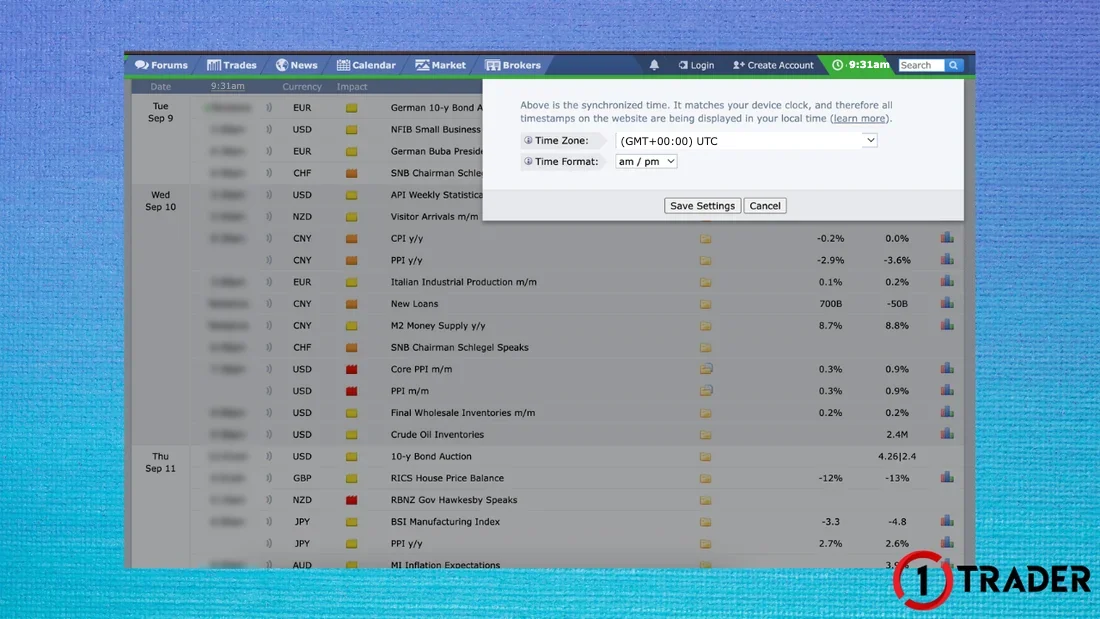
US news times shift by 1 hour with the seasons: the US uses daylight saving time, so releases at 8:30 New York time come out at 12:30 GMT from about March to November and 13:30 GMT in winter (in 2026 the US returns to standard time on 1 November). Once your time zone is set, Forex Factory adjusts the times automatically.
Parts of the news calendar
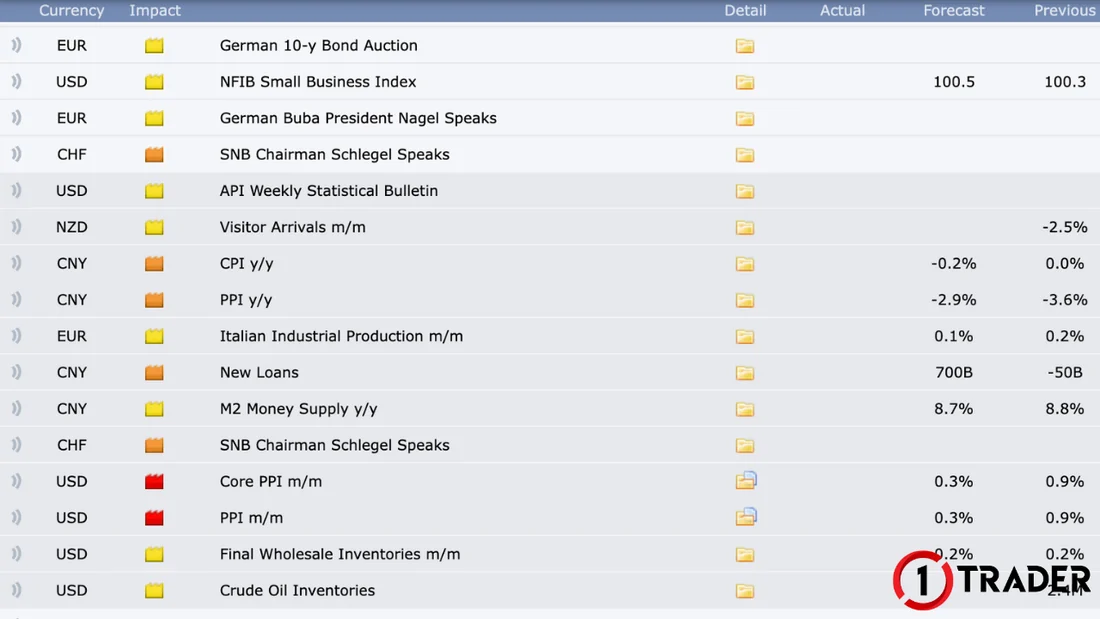
- Time
- Release time (in the time zone you set). Tentative means no exact time yet; All Day is an all-day event
- Currency
- The currency the news relates to, such as USD, EUR, JPY, GBP, CNY
- Impact
- How strong the news is: yellow = low · orange = medium · red = high · grey = not economic data, such as a holiday
- Event
- The event name, such as Core CPI m/m (m/m = vs last month · y/y = vs last year · q/q = vs last quarter)
- Detail
- The folder icon; click it to open the news details
- Actual
- The figure actually released; blank until the news comes out
- Forecast
- The figure the market expects, compared with Actual
- Previous
- The previous figure (sometimes revised)
What the colour of the Actual figure means
Better than expected
The figure is better for that currency than the forecast, such as more jobs than expected or lower unemployment than expected
Worse than expected
The figure is worse for that currency than the forecast, such as Core CPI at 0.2% versus 0.3% expected (seen as less pressure to raise rates)
The colour shows the usual effect on the currency, not whether the number is high or low. For some data, lower is better, such as unemployment, and the colour doesn’t guarantee the price direction. If the figure matches the forecast, it stays the normal colour.
How to view the news details
Click the folder icon in the Detail column after the event name to open its Specs and History. The example below is US Core CPI m/m, released on 11 Sep 2025 at 12:30 GMT.
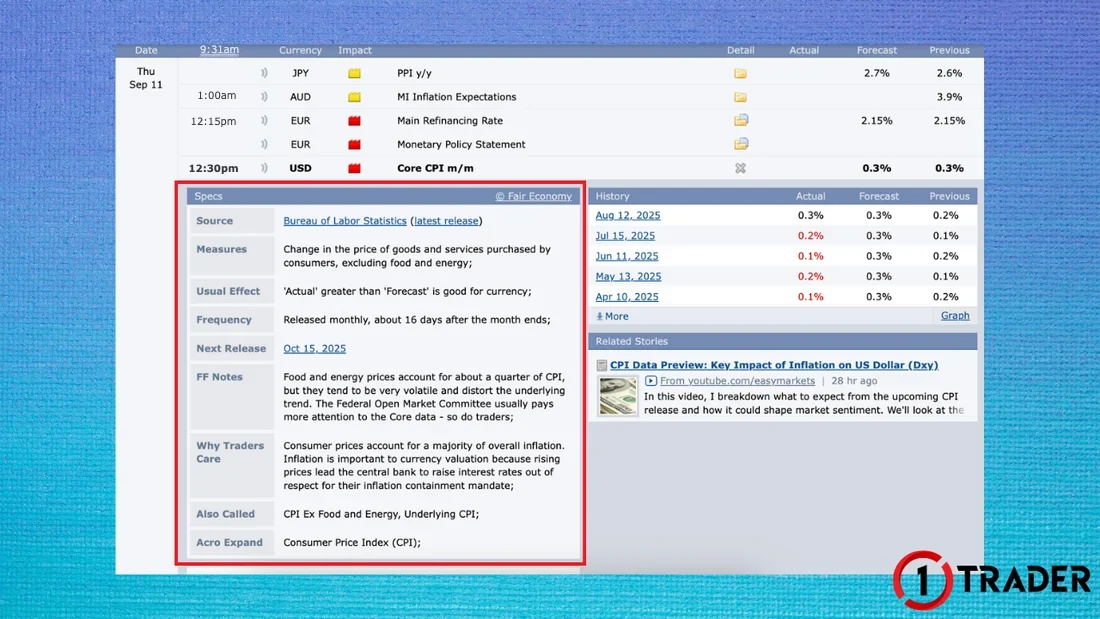
- Source
- The agency that releases the figure, such as the Bureau of Labor Statistics
- Measures
- What the figure measures; Core CPI measures the change in prices of goods and services bought by consumers, excluding food and energy
- Usual Effect
- The usual impact, such as “Actual greater than Forecast is good for the currency”
- Frequency
- How often it is released, such as monthly, about 16 days after the month ends
- Next Release
- The next release date
- FF Notes
- Notes from Forex Factory, such as why the market weighs Core more than the headline figure
- Why Traders Care
- Why traders follow it, such as high inflation possibly leading the central bank to raise rates
- Also Called / Acro Expand
- Other names and the full form of the acronym, such as Consumer Price Index (CPI)
- History
- Past Actual · Forecast · Previous for each release; click More or Graph to see more
In History, months where Actual was below Forecast (such as 15 Jul 2025: 0.2% vs 0.3% expected) show in red. The next release date can also move: September 2025 CPI, shown as 15 Oct in the screenshot, was delayed to 24 Oct 2025 because of the US government shutdown, so check the calendar again every week.
How does each type of key news affect prices?
News on Forex Factory falls into 5 main groups. Gold (XAUUSD) is priced in dollars, so USD news moves gold directly. In general, a stronger dollar usually means weaker gold and a weaker dollar usually means stronger gold.
Jobs
Usual effect: jobs better than expected → strong economy → USD stronger, gold usually weaker
Inflation
Usual effect: higher than expected → risk of rate hikes (or slower cuts) → USD stronger, gold usually falls
Central banks
Usual effect: hawkish signals → USD stronger, gold falls · dovish signals → USD weaker, gold rises
Economic activity
Usual effect: shows whether the economy is growing or slowing → the market reads it for whether the Fed will raise or cut rates
5 · Other news worth watching
- Crude Oil Inventories
- US crude stocks; listed under USD but affects oil prices and oil-linked currencies like CAD more
- Trade Balance
- The difference between the value of exports and imports
- Consumer Confidence
- Used to gauge future spending trends
The directions above are what usually happens, not fixed rules. Follow each country’s policy rate in the global central bank rates table.
Don’t rely on the news too much
Forex Factory is a key planning tool, but remember that the chart doesn’t always follow the news.
Base your analysis on price structure with multi-timeframe analysis (EP19) and zones from EP5 Demand & supply zones, then use the news calendar to know when to be careful.
Summary: key news and gold
| News type | Key releases | If better than expected | Gold usually |
|---|---|---|---|
| Jobs | NFP · Unemployment Rate | USD stronger | Weakens |
| Inflation | CPI · Core CPI · PPI · PCE | Higher than expected → USD stronger | Falls |
| Central banks | Fed Rate · FOMC · Fed Chair | Hawkish → USD stronger | Falls (rises if dovish) |
| Economic activity | GDP · Retail Sales · ISM/PMI | USD stronger | Usually weakens |
| Other | Crude Oil · Trade Balance · Consumer Confidence | Depends on the release | Smaller effect |
In short: big news means volatile prices. USD news moves gold directly: positive US data strengthens the dollar and usually weakens gold, while negative data weakens the dollar and usually lifts gold. In the end, the chart tells the truth about which way the market chose.
FAQ about Forex Factory
What is Forex Factory?
Forex Factory (forexfactory.com) is a free website that brings together the economic calendar, economic data and key events that move currencies and gold in real time. It shows a day-by-day table with the time, currency, impact, event name and the Actual, Forecast and Previous figures, plus breaking news that isn’t on the calendar.
Do I need to sign up to use Forex Factory?
You can view the calendar for free without signing up. If you want the site to remember settings such as your time zone or currency filters on every device, a free account is more convenient.
How do I set the time zone on Forex Factory?
Click the time at the top of the page, choose your time zone, such as (GMT+00:00) UTC, then click Save Settings. All news times switch to that zone, and the site adjusts US release times automatically when the US changes to or from daylight saving time.
What do yellow, orange and red mean on Forex Factory?
They are the Impact colours showing how strong the news is: yellow is low impact, orange is medium and red is high. Grey marks events that aren’t economic data, such as holidays. Red USD news usually makes gold the most volatile.
What is the difference between a green and a red Actual figure?
Green means the released figure is better for that currency than expected; red means worse than expected. The colour is based on the effect on the currency, not whether the number is high or low. For example, unemployment lower than expected shows in green.
What time is US news released in GMT?
Major releases such as Non-Farm Payrolls, CPI, PPI and Retail Sales come out at 12:30 GMT while the US is on daylight saving time (about March to November) and 13:30 GMT in winter. FOMC decisions come out around 18:00 or 19:00 GMT.
Why doesn’t price follow good news?
The market may have already priced it in, or investors may read the effect on interest rates differently from you. Sometimes price moves hard in the first few minutes and then reverses. Use the news as a supporting factor, and decide based on chart structure and your trading plan.
Read EP20 again Next lesson · EP22 What Is Risk/Reward? How to Calculate RR and Break-Even Win Rate RR formula · break-even win rate · expectancy · real use
Read EP22 →
See all lessons in the free Forex and gold trading course
Risk warning: Trading Forex, gold and CFDs carries a high level of risk and you may lose money, especially around big news when spreads widen and slippage can occur. 1TRADER provides information and education to support your own decisions only. Past results do not guarantee future results. Forex Factory is a third-party website. Read the full risk disclosure.